
Add real-time
urgency to
every email.
Turn readers into buyers with a live deadline they can watch tick down — right inside any email or on any page. No special ESP, no developer.



1200+ brands
boosting conversions with Tickvio
Grab 40% off before it's gone. This offer expires when the clock hits zero.
Shop the Sale — 40% off →Up and running in minutes
Three steps to add live countdown timers to any email — no dev time, no waiting.
Design your timer
Pick a style, choose your colors, and set a deadline — or use evergreen and recurring modes for automated urgency.
/t/a3f2c?tz=UTC"
alt="Sale ends soon" />
Copy the timer code
Tickvio generates a simple html code, you get with one click. Each subscriber gets a live, accurate timer when they open — rendered on the fly.


Paste into any ESP
Works with Klaviyo, Mailchimp, HubSpot, ActiveCampaign, Omnisend, and 50+ more — if it sends HTML email, it works.
Proudly used by brands of various sizes












Built to move
your numbers
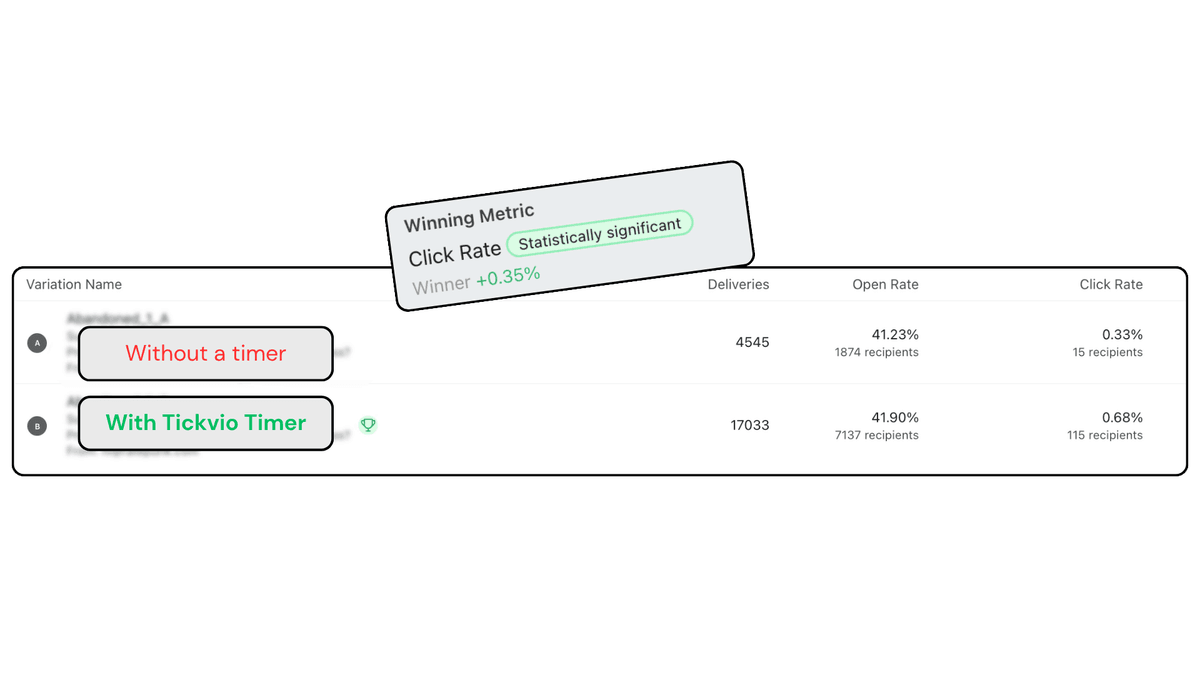
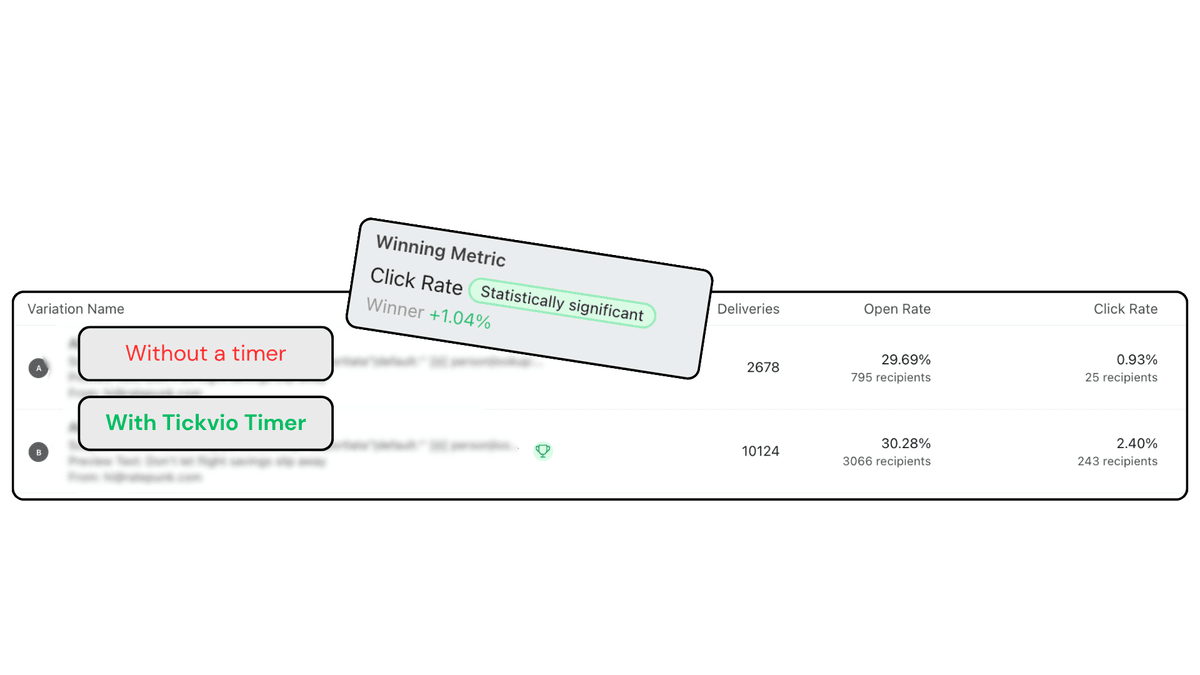
A timer only matters if it changes behavior. Across brands and campaigns, the variant with a Tickvio countdown keeps winning on clicks.
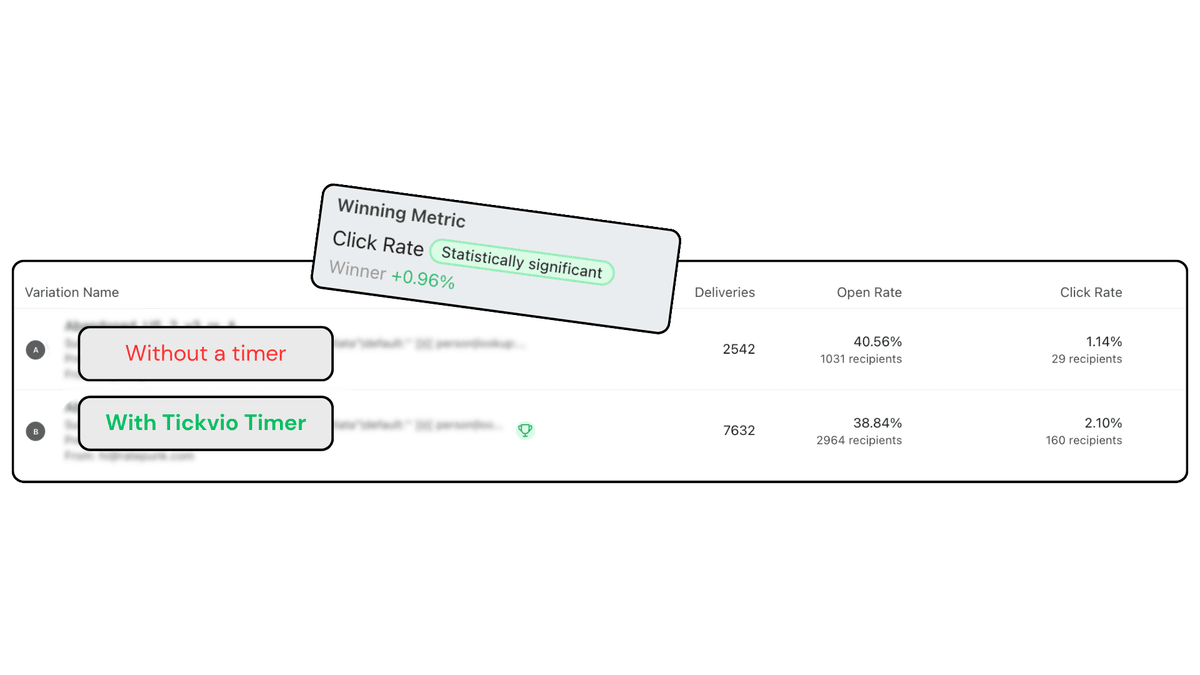
Same email. One had a timer.
The only difference between the two variants was a live Tickvio countdown. The timer variant won on click rate.
Higher click rate
The variant with a Tickvio countdown nearly doubled clicks over the same email without one — 2.10% versus 1.14%.
No fluke
The lift held up across thousands of deliveries — statistically significant, not noise.
Not a one-off. Different brands, different campaigns — the version with a Tickvio timer keeps coming out ahead.
Loved by email marketers
Real results from real teams — here's what marketers say after adding Tickvio to their stack.
We added Tickvio to our flash sale emails and the difference was immediate. Our open-to-click rate jumped from 2.8% to 4.0% in the first campaign. The evergreen timer feature is genius — every subscriber sees a personalised countdown from the moment they open.
in 30 days
Tickvio transformed our abandoned cart flow. Adding a live countdown to our recovery emails was a game-changer — we're recovering almost 3× more carts than before. Klaviyo setup took less than 2 minutes.
Tom Anderssen
Growth Lead, Volta ApparelWe couldn't justify the pricing of other tools for our small team. Tickvio gives us the same urgency power at a fraction of the cost. Our welcome series with a recurring timer doubled email revenue in the first quarter.
Lena Marchetti
Founder, Solara BeautyWe run campaigns across 12 markets and Tickvio's evergreen countdowns have been incredible. Every subscriber gets their own urgency window — boosted our clicks by 41%. Analytics makes optimisation effortless.
Raj Mehta
Head of CRM, Dune Active
Ready to add urgency
to every send?
Your first timer takes less time than reading this sentence. Free plan. No credit card. No kidding.
Free plan includes 20,000 views/mo · No credit card required
Frequently asked questions
Everything you need to know about Tickvio — from setup to security, for email and web.
What is Tickvio?
Is Tickvio free to use?
Do I need coding skills?
Which email platforms does Tickvio work with?
What types of countdown timers can I create?
Can I use timers on my website too?
How customisable are the timers?
How fast do timers render?
What happens when a timer expires?
Is my subscriber data safe?
Still have questions? We're here to help.